Subsection 5.6.1 Importing and Merging the Data
Exercises Exercises
Finding Data Online.
1.
Go to the website
tracktranslegislation.com, which in turn obtains its data from
LegiScan, and browse around. What are two things that you notice about the site? Two things that surprise you? Two things that aren’t on the site that you wonder about?
2.
3.
We’d like to get a sense of how anti-trans legislation in the U.S. changed over time, so we’re going to try to
merge the Track Trans Legislation (TTL) data with the ACLU data. Since the ACLU data has different bill "Status" categories than TTL, we’ll need to figure out how to classify each ACLU bill into one of the TTL categories.
Use the
Terminology page on the TTL website to answer the following question. Which of the TTL categories would you classify "Referred to committee" into? "Hearing scheduled"? "Withdrawn"? You may want to click on the bill numbers on the ACLU site to see how the website LegiScan, a constantly-updated bill tracker, classifies each bill.
Note that the 2020 ACLU page was last updated on March 20, 2020, since many state legislatures were suspended or closed during the first year of the COVID-19 pandemic; the ACLU page promised to “update the tracker as major new developments occur[red] .” This data has distinct variable names and organization, so we also modify the ACLU data to match the Track Trans Legislation data as closely as possible.
For example, bills that were withdrawn, not passed by the end of a given legislative session, explicitly listed as “Dead”, or were recommended against by a committee and did not proceed in the legislature were relabeled “Dead” (at least for that year). The exception is when the bill description is specifically listed as “hearing scheduled”, “referred to committee”, carried over from another year, or otherwise makes clear that the bill is still under consideration, in which case “Introduced” or “Crossed Over” (depending on whether the bill had been passed by at least one chamber) is used.
We only include bills in categories tracked by both data sources; this leaves out, for example, bills preventing localities from passing anti-discrimination ordinances within a state. We use a broad reading of the “religious freedom” category to include bills that allow for people with “sincerely-held religious beliefs” in that state to challenge nondiscrimination laws, discriminate against LGBTQ+ people, refuse to provide healthcare to LGBTQ+ people, refuse to provide adoption services to LGBTQ+ people; discriminate against married LGBTQ+ people, and receive funding for discriminatory student groups at public universities, among others.
Subsection 5.6.2 Cleaning the Data
Cleaning is a process that involves fixing or removing incorrect, corrupted, incorrectly formatted, duplicate, or incomplete data within a dataset. For more information, check out Tableau’s
Guide to Data Cleaning. After importing and merging data sets, it is integral to clean the data before working or manipulating the data and producing any conclusions. While the cleaning process can be done manually, it is much more efficient to use a software program such as Microsoft Excel or a programming language such as R when working with multiple data sets or large quantities of data.
Here are the steps to clean your data:
First, the 2018-2020 ACLU datasets code state names by their two-letter abbreviations (e.g., “AZ” instead of “Arizona”), while Track Trans Legislation uses full names. So we use a program to convert full names to abbreviations in the whole dataset. We have done this cleaning and it can be found in ADD GITHUB LINK HERE! You can see the code we used here: ADD THE CODE FOR STUDENTS THAT ARE CURIOUS!!!! We also note that, for example, the 2021 dataset includes some bills passed in January 2022, so we eliminate duplicate bills.
This decreases the number of bills in our dataset from 927 to 893. Next, note that the bills whose status is labeled
Introduced* by TTL are those that failed to meet their state’s “crossover deadline”, the date by which a bill must pass out of the chamber in which it was introduced and to the other chamber (e.g. State House vs. Senate). According to the site
Track Trans Legislation, a bill that is not passed in its initial chamber by the crossover deadline “faces high procedural hurdles in order to move forward.” Thus, we wish to classify these bills (at least for the current session) as “Dead/Failed”.
Moreover, one bill’s status is listed as “Posted”, Kentucky’s HB132 in 2020.
LegiScan research reveals that this bill died in committee, so we update its status to
Dead/Failed.
1. Let’s look at the data from all states, all bill types, and all statuses (i.e. you should not be filtering anything in this case). Click on the “Export” button and download the data as a CSV file.
2. We now need to open the CSV file in Excel. To do this, take the following steps: Open Excel. Select File → Open…→ Choose the CSV file. The Excel sheet should populate with the data.
3. To get a preview of what the data looks like, go to the Home tab within Excel and press Analyze Data. A side panel should appear on the right of the screen. Always be sure to check these insights present the information clearly.
Excel file downloaded from Track Trans Legislation displaying the "Analyzing Data" button and corresponding window.
4. Remove any duplicates. To remove duplicates: Data → Remove Duplicates, ensure that all columns with duplicates are checked off so they are removed.
Excel heading with the "Data" tab and "Remove Duplicates" button highlighted in a red box.
5. Now, let’s make sure the formatting is consistent. Let’s try lowercasing all of the state names. First, create a new column to the side of the states column. Next, in this new column, enter “=LOWER( )” function into the first cell. In the parentheses, write X:X, replacing the Xs with the letter of the original column and hit enter. This will populate the new column with all of the state names in lowercase letters:
Columns E and F from Excel file showing the before and after results of using the "=LOWER()" function
Note: If you don’t want the formulas in the resultant cells, you just want the new lowercased versions of the names as if they had been hand-typed, you can select the names, press Control-C to copy them, navigate to Paste → Paste Values, and paste them into a new column or on top of the column you had previously made. Doing this will allow you to delete the original column without affecting the new, lowercase column. We can also capitalize all letters in the cells we select by using “=UPPER( )” or use “=PROPER( )” to reset the capitalization so the first letter is the only one capitalized.
Drop down from the "Paste" with "Paste Values" highlighted in green.
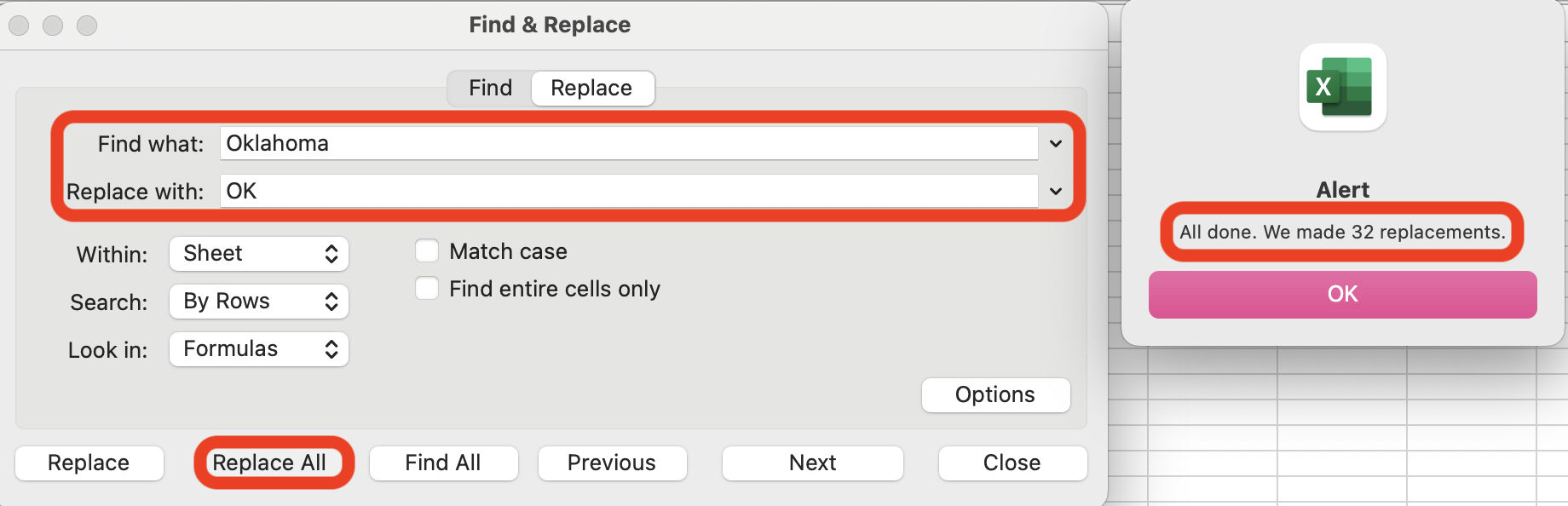
6. Next, we will find entries for the state of “Oklahoma” and replace them with the state abbreviation “OK” using the Find and Replace function. To do this, the following steps apply: First, navigate to Home → Editing → Find & Select. Next, Replace → Find what: “Oklahoma” and Replace with: “OK” → Replace All. Note, the alert will notify you of how many cells were altered and you should make sure that all planned changes were made.
Excel heading with the "Home" tab and the "Find & Select" button highlighted in red boxes.
The "Find & Replace" pop-up window with "Find what:" and "Replace with:" dropdowns, the "Replace All" button, and alert message highlighted in red boxes.
7. Finally, we can use the TRIM( ) function to eliminate excessive spaces. For example, if in our data set we have “ Arizona” (note the extra space before the A) and we want “Arizona,” we first need to create a new column adjacent to the state column. Next, in this new column, enter “=TRIM( )” into the first cell. In the parentheses, write X:X, replacing the Xs with the letter of the original state column and hit enter. This will populate the new column with all of the state names without excessive spaces.
Note: The TRIM( ) function will not remove any spaces between two words in a state name (“North Carolina” to “NorthCarolina”), it will just remove excess spaces at the beginning and end of the state name.
Subsection 5.6.4 Cleaning for Text Analysis
Text analysis is the process of using computer systems to understand human-written text for analysis purposes including analyzing legislation. Text can be analyzed from unstructured data sources such as emails, surveys, documents, and other online material to extract insights. The main feature of text analysis is training computer software to associate words with meanings, similar to how humans learn a new language through objects, actions, and emotions. Deep learning and natural language processing (NLP) are the principles of text analysis.
(Source).
The goal of this section is to give foundational steps to clean a txt document in R studio and then use R studio to analyze the text using frequency analysis, bigrams, and optionally networks.
In this chapter, you will explore anti-trans legislation through text analysis. Note, this approach requires additional cleaning. This cleaning process depends on the specific bill, its formatting, and your group’s preferences. Decisions must be made about how much you want to clean the data for your specific project.
Note: whenever you download a file to open in R or R Studio, make sure to set your working directory to wherever that file is located. For example, if you have the file just on your desktop (not in any folder), entering
“setwd("~/Desktop")” in the console window will set the working directory to your desktop.
Activity 7.
Before we do any text analysis, we have to do some data cleaning. We will use an Arizona bill regarding trans legislation as an example, which can be viewed
here.
After downloading the "4-bill-test" excel file, we can enter the following code in R:
This will install some necessary packages for cleaning and read the excel file into R. We want to look at first anti-trans bill in the excel file- an Arizona bill vetoed that addresses pronoun use in schools. Add the following code below what you already have:
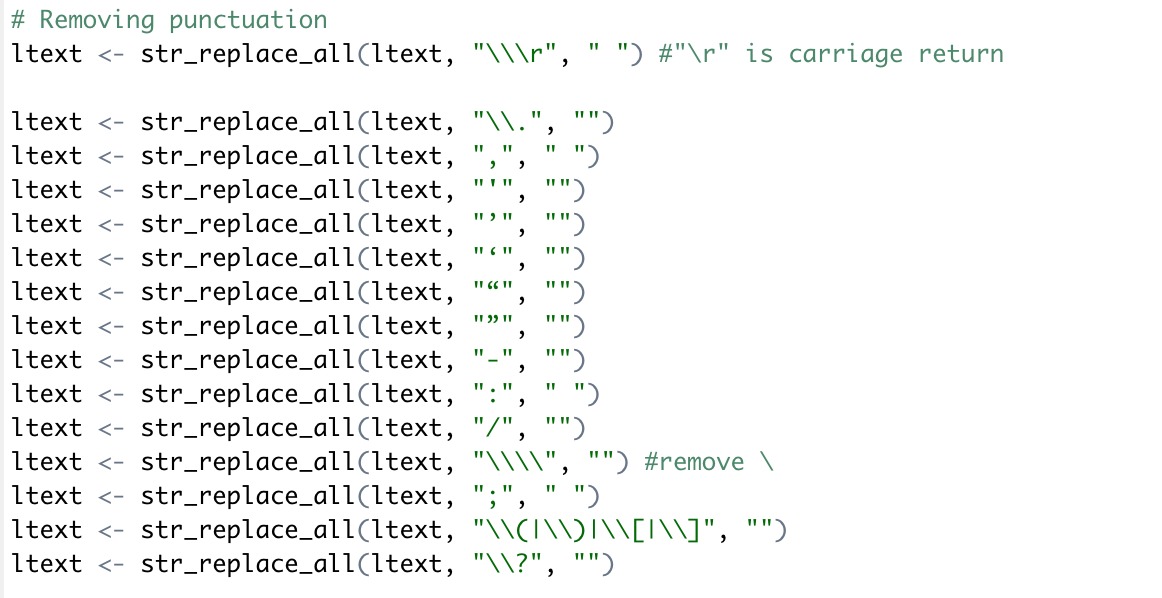
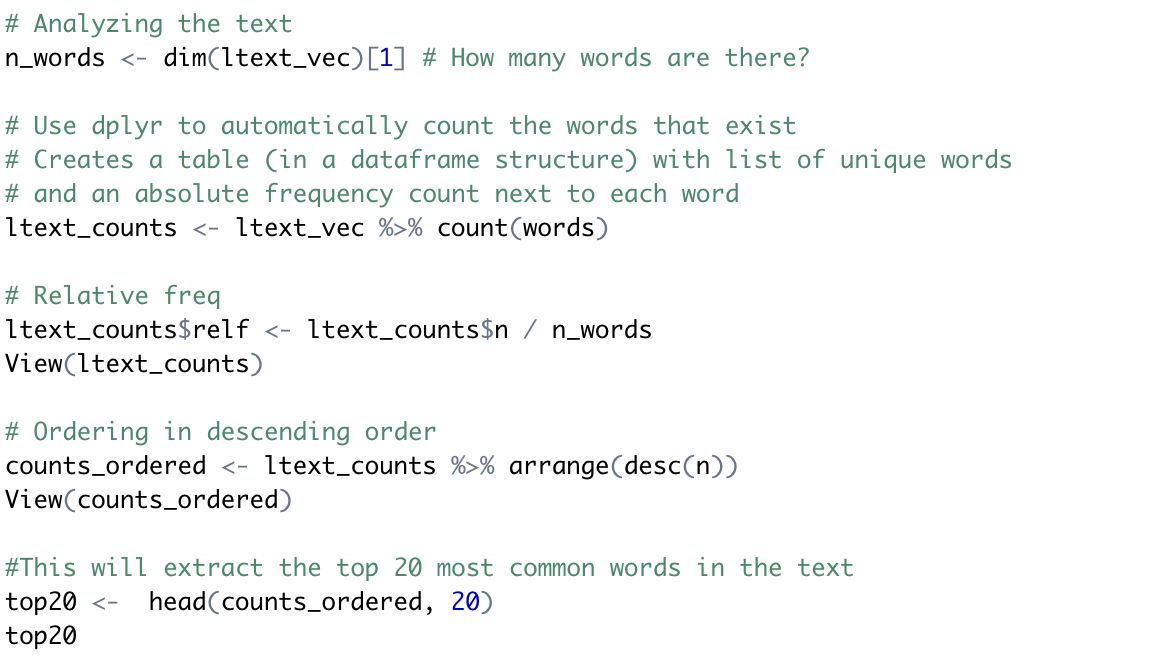
This code will output the first row of text of the bills file. We will now clean this section with the following code. Run each block one at a time along with the code from above. You can enter "ltext" at any point to check your progress.
-
-
-
Deleting a phrase or line.
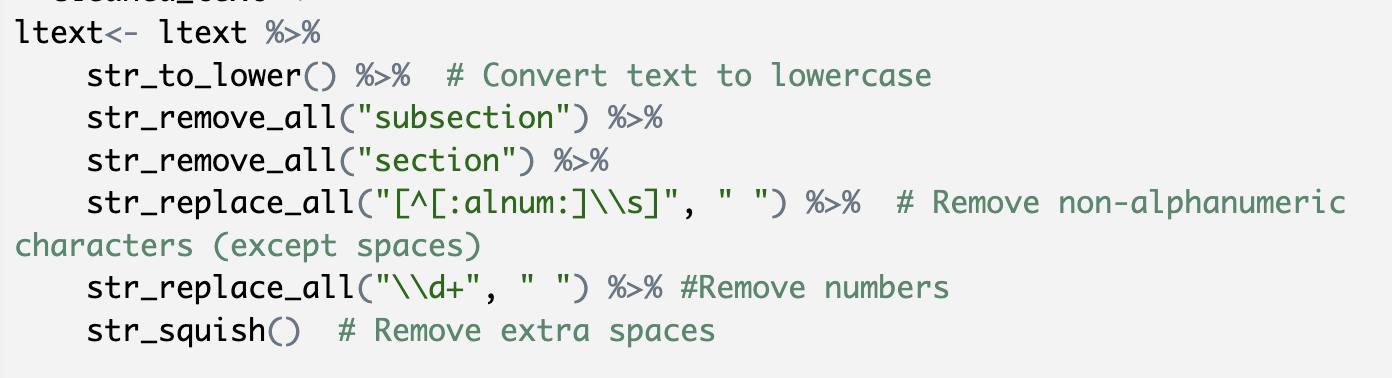
This text tends to have a 1. and a. and (a) and (b). We already eliminated parentheses and periods, so now we are going to eliminate all single letter words and numbers. We are intentionally not removing all numbers. There are several references to K12 or under 18 so we want to maintain these. We also want to make sure that our words will be recognized as the same when we construct relationships, so we have to convert everything to lowercase.
-
Removing redundant spaces.
-
Identifying and eliminating stop words.
Stop words are common words that carry little textual meaning, so we do not need to include them in our analysis. For example, "the", "are", "is", etc...
After cleaning the data, a block of text remains.
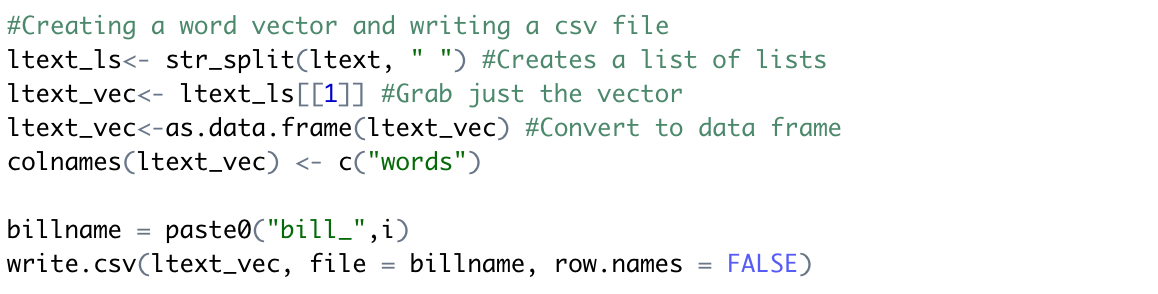
In order to analyze the block of text, we need to get these words into what is called a word vector. For those unfamiliar with the idea of vectors, word vectors are a list of words, with one word on each line. If you are familiar with vectors from other math courses, the idea of a word vector is similar: it is a list of words in an array format. We can create a word vector and save it as a new csv file with the following code:
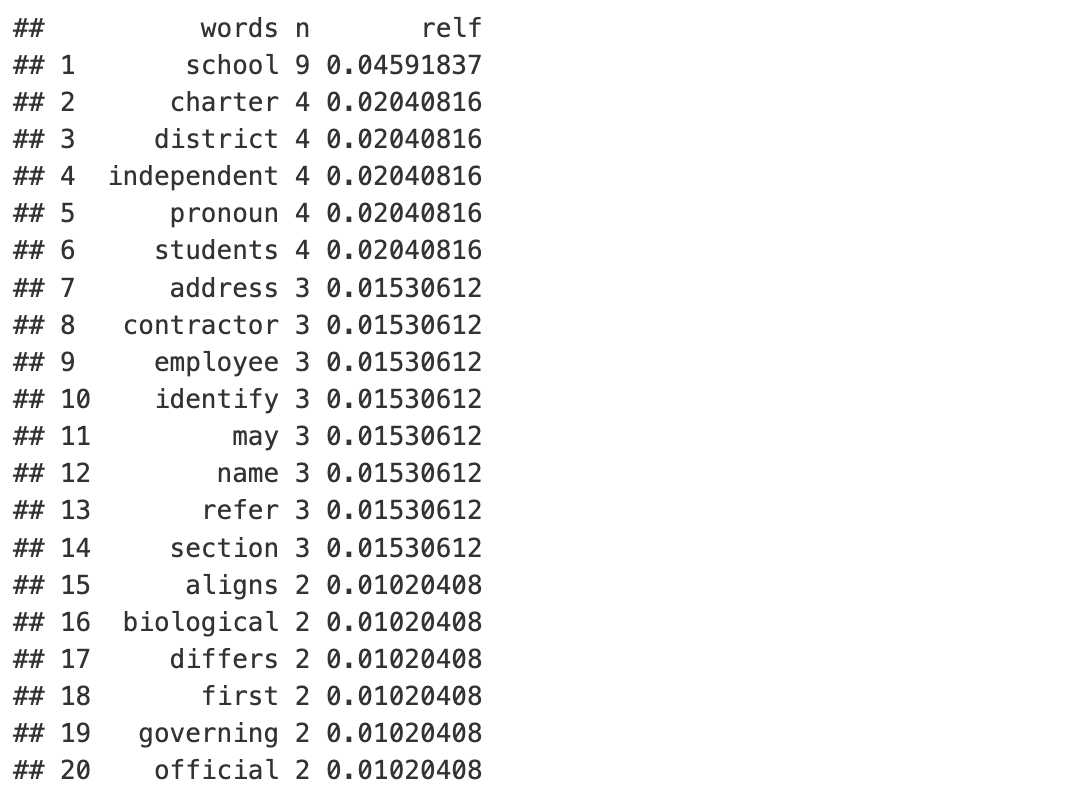
You can enter "ltext_vec" to view our word vector. Play with the following code to analyze your text.
We can note that the relative frequency (rflel) is the number of times a particular value for a variable has been observed in relation to the total number of values for that variable. We can also see from our top 20 list that "school" and "pronoun" were of the most common words used in the text. This makes sense given the context of this bill.
Subsection 5.6.5 Visualizing Text Analysis Data
We can continue our investigation of the bill by creating and analyzing visualizations.
Activity 8.
-
-
Open atl_heritage.Rmd in R Studio and run the code by selecting Run→Run All. A small yellow banner may pop up at the top of your screen that you do not have a library installed. Press “Install,” and run the code again.
-
Tabs named “bills,” “template_leg,” “probills,” “ltext_cuonts,” and “counts_ordered” appear in the bar next to the original .Rmd file. What information do each of these tabs contain?
-
After running the code, some tables and graphs will appear directly in the code. Return to the .Rmd tab and scroll through the code until you find the following table. How many times does the word “employee” appear in the bill? Hint: look at the “n” column. What is the relative frequency of the word “education”? Hint: look at the “relf” column.
-
Continue to scroll through the graphs. Talk with a partner about what looks nice in each graph, and what you would want to change. Which graph is your favorite? Why?
Subsection 5.6.6 Exercises
Now, it’s your turn to try!
Checkpoint 5.6.1.
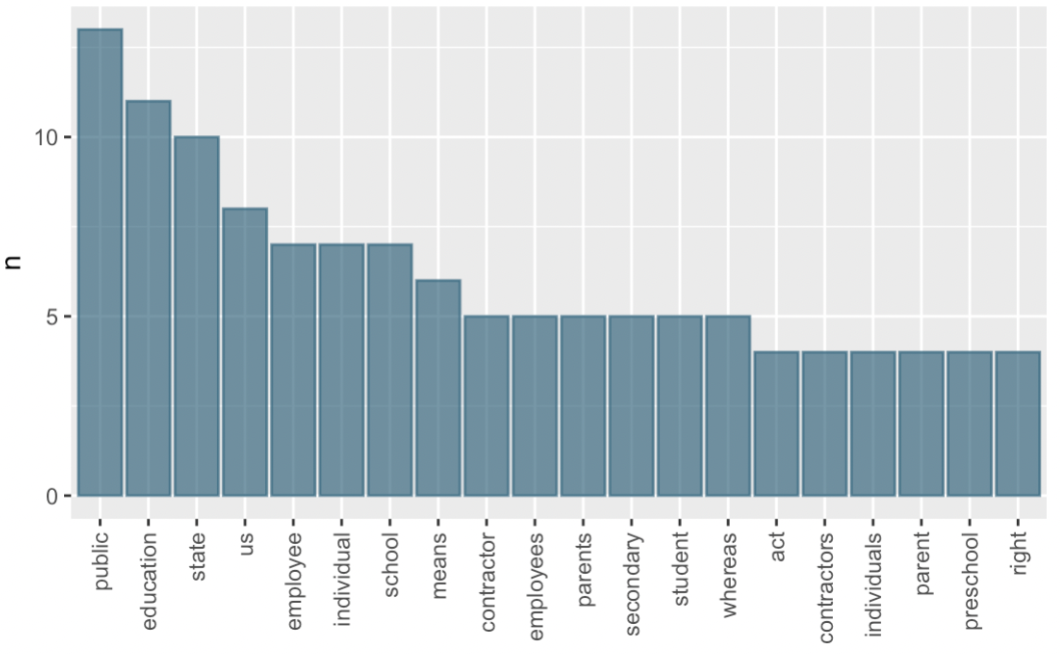
Using the following graph, answer the questions 1-6.
-
What does the label “n” on the y-axis mean?
-
What title would you give to the graph?
-
How many words appear exactly 5 times in the bill?
-
How many words appear at least 7 times in the bill?
-
What word appears the most?
-
What might this information tell us about the bill?
Checkpoint 5.6.2.
List 3 things you can do to clean data learned in Section 5.4 and 3 things you can do to clean data for text analysis (discussed in this section). What are some similarities and differences between the methods you came up with?
Checkpoint 5.6.3.
What do you think would happen if you didn’t clean the data before making a word vector? How might the graph look different?
Checkpoint 5.6.4.
Which cleaning method for text analysis do you think would be most useful to learn? Why? This question is asking for an opinion, there is no right answer.
%20Cleaning%20data%20example.png)
%20Cleaning%20Data%20Example%201%20(5.3).png)
%20Cleaning%20data%20example.png)
%20Cleaning%20data%20example.png)
%20Cleaning%20data%20example.png)
%20Cleaning%20data%20example.png)